
Back to faqs
'BonusTool.dll' does not exist
Chris McKeown / September 22, 2025
Licensing
~1 min read163 words
0 views
'.\BonusTool.dll' does not exist
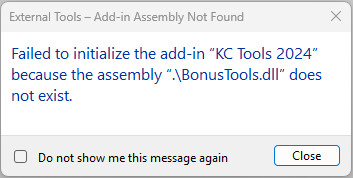 This typically happens when a install was not fully completed either due to Revit being open at the time of install or lack of permissions to install.
Revit being open at the time of install
Revit will lock some files which means not all new files are installed correctly. To fix:
- Close all Revit sessions.
- Download the latest Bonus Tools installer (
BonusTools-<version>.msi) from the Autodesk App Store or the releases page, and run it. You need administrator rights. It removes any older install and won't run while Revit is open. See Installation. - Bonus Tools is then installed at
C:\Program Files\BonusTools. - Older versions installed to the folders below. If either folder still exists after installing, close Revit and delete it:
C:\ProgramData\Autodesk\ApplicationPlugins\BonusTools.bundleC:\Users\%username%\AppData\Roaming\Autodesk\ApplicationPlugins\BonusTools.bundle
If it's still not working, open About in Revit and click Send Journal Files, or send a print screen of C:\Program Files\BonusTools and its PackageContents.xml file.